How to manage projector alignment, edge blending, black levels, and brightness for dome projection
Projector warping and blending: A guide for domes and planetariums
Dome projection asks a projector to do something a flat-screen installation typically doesn’t. The image needs to hold its geometry across a continuously curved surface; several projectors have to behave as one; and the brightness needs to be uniform across the entire image.
If you’re planning a dome or planetarium installation, the decision isn’t only about which projector to buy, but about how you intend to solve geometry, blending, and brightness.
This article will walk through each of these in detail.
Geometry: Aligning the projected image to the surface
A dome has no flat plane to project onto, so the image needs to be warped before it reaches the surface. Every projector in the array contributes a piece of a single continuous image onto a curve, and each piece must be aligned so that the whole reads as a single geometrically correct picture for the audience.
Aligning projectors manually is possible, but it’s time-consuming, and maintaining that alignment over time is even more challenging. Projector alignment shifts over time due to thermal expansion, setup adjustments, and building settlement. What was aligned at commissioning doesn’t necessarily stay aligned, and the correction may not be a small one when several projectors each need re-registering against a curved surface.
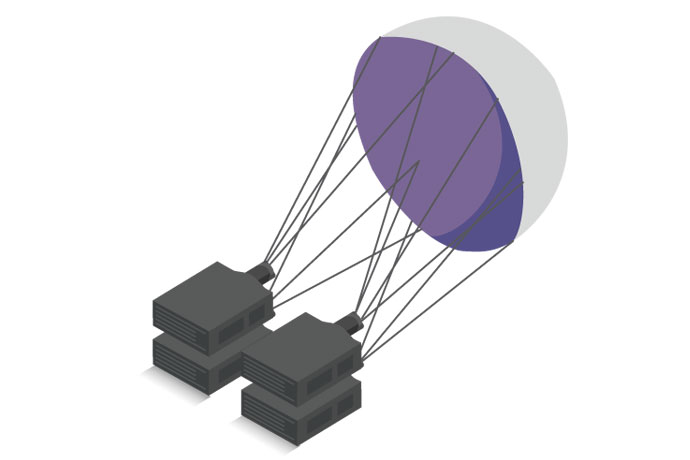
A simple diagram of a multiprojector installation on a dome surface
This is where automated alignment earns its place. Camera-based software aligns, calibrates, and maintains a multi-projector setup. But not all alignment software is created equal. Christie’s software engineers designed Christie Mystique™ so that, with just a couple of clicks, its camera-based software automatically aligns each projector in less than two minutes—creating a multi-projector array in minutes instead of the hours required for manual alignment.
The practical question when you are specifying your projection system is how to keep the array aligned, how often it needs realignment, and what the image looks like over time.
Blending: Making several projectors display one image
Every projector in a dome array overlaps its neighbors. Those overlapping regions are where a multi-projector image either becomes seamless or becomes what your audience looks at instead of the content. Blending is the process of making those overlaps disappear, and doing so on a curved surface is harder than on a flat screen because the geometry of each overlap varies across the dome.
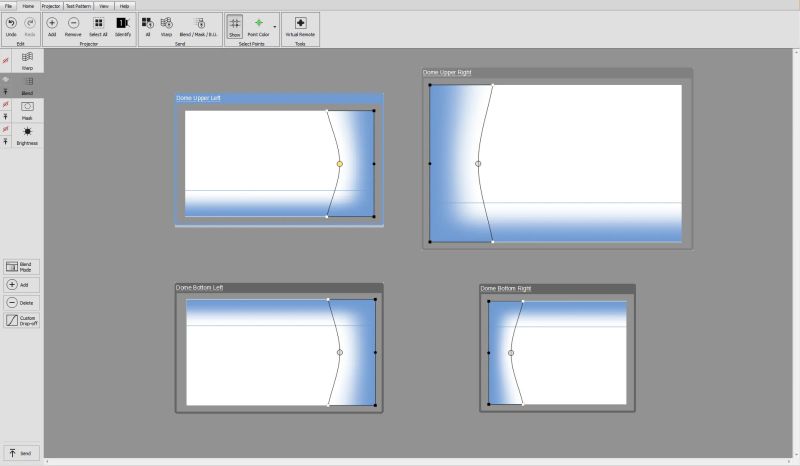
A screenshot of projector blending functionality in Christie Twist
Christie® splits this work across two tools, each doing different jobs. Christie Twist™ performs warping and edge blending, running on the projectors through a grid point/mesh interface. Mystique works in conjunction with Twist to automate the process, using camera-based software to align, stack, and blend the array.
Selecting the right tools for your installation
To ensure the best possible experience for your audience, it’s important to match your projector warping and blending tools to your installation’s requirements.
With Twist, which is built into most Christie projectors, the complimentary version supports up to six projectors in an array with up to 81 grid control points. For more complex installations involving flat or slightly curved screens, Twist Premium raises that to 18 projectors and adds automatic blending. Automatic blending on complex curved screens and domes requires Twist Pro, which uses a field-of-view mode and supports up to 1,500 arbitrary or grid control points across an unlimited projector array.
Mystique Premium Edition and Large Scale Experience Edition are designed for domes as well as flat and curved screens, wave shapes, and toroidal screens, working either from built-in basic screen shapes or from an imported 3D model of your projection surface. They support the most complex projection layouts with any number of projectors.
Blending projector black levels
In a planetarium, most of what you show is dark. That makes overlap regions unforgiving. Where two projectors overlap, they project a very dark gray, dictated by their “black floors”. The light from those two projectors combines in the overlap area, creating a brighter band or visible seam across the screen that is particularly noticeable when the projected content is dark or features a high-contrast scene.
“Every projector in the array contributes a piece of a single continuous image, and each piece must be aligned so that the whole reads as one geometrically correct picture.”
Mystique's electronic black-level blending feature addresses this directly. It balances projected black so that each projector's black level matches the sum of the black levels in the overlap between projectors. This keeps the black level uniform across the whole canvas and effectively hides the seam. This feature is included in the Mystique Large Scale Edition or as an optional add-on to Mystique Premium.
If your content is predominantly dark, uniformly blending black levels is the difference between displaying one continuous image and displaying one with visible seams.
Keeping your projectors aligned over time
As we’ve already mentioned, alignment on day one is the easy part. Making sure your projectors stay aligned can be challenging.
Manual recalibration, by adjusting screen points in the Mystique software, and re-running the calibration, is available across all Mystique editions. The automatic camera-based recalibration feature lets you realign with a click of a mouse and corrects for slight camera or projector movement. Automatic recalibration for multi-camera and complex-screen systems using screen markers, a set of LED or laser marker reference points embedded around the projection surface, is available with Mystique Premium Edition and Large Scale Experience Edition.
Brightness: How many lumens do you need?
As a starting point, mid-size domes and planetariums tend to require projectors with around 15,000 lumens, while large domes generally need projectors with between 30,000 and 50,000 lumens. The brightness level that’s right for your installation depends on the size of your dome, the gain of your projection surface, and the content you intend to run on it. A planetarium showing deep-sky imagery and a dome running bright, high-motion content will have different brightness requirements.
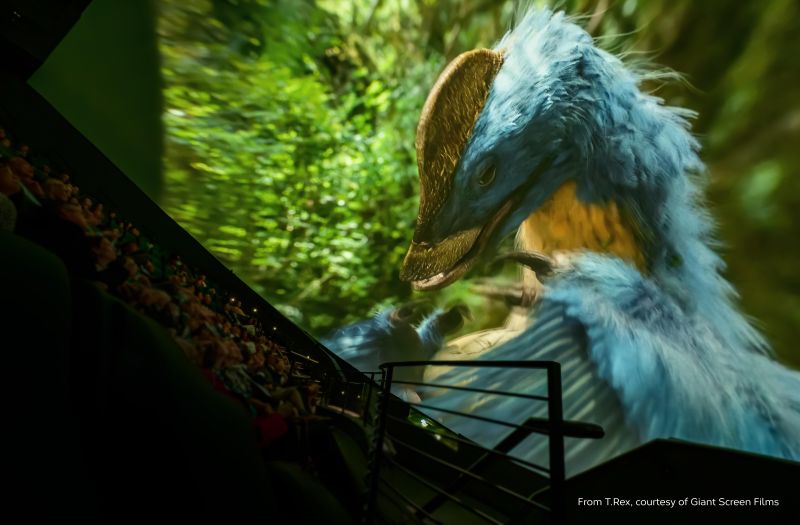
Brightness and illumination technology requirements are often higher for colorful, high-motion content.
Illumination technology matters here as much as raw output. RGB pure laser projectors deliver high lumen output with a wide color gamut, supporting the Rec. 709, P3 and 98% of Rec. 2020 color spaces. Laser phosphor projectors are typically better suited for smaller dome installations with high-gain screens and Rec. 709 color.
Choosing a projector for a dome or planetarium
For mid-size domes and planetariums, the M 4K+15 RGB and M 4K+25 RGB 3DLP RGB pure laser projectors deliver 15,750 and 25,300 lumens, respectively, in a compact chassis with support for Rec. 709, P3 and 98% of Rec. 2020.
Christie Sapphire® 4K40-RGBH is a unique 3DLP, 40,950-lumen, native 4K resolution projector with a dual illumination source that combines RGB pure laser and laser phosphor illumination. In addition to support for Rec. 709, it produces stunning P3 color and is engineered for any 2D application as well as all active and passive 3D formats.
Christie Griffyn® 4K35-RGB and 4K50-RGB projectors deliver 36,500 and 50,000 lumens, native 4K resolution, high contrast, and support the Rec. 709, P3 and Rec. 2020 color gamuts.
The 6DLP Eclipse G3 is the ultimate dome and planetarium projector for uncompromising immersive experiences. In a class of its own, it delivers true HDR performance with the deepest, darkest onscreen blacks imaginable, and a degree of detail and depth of color not possible with any projector.
For DCI-compliant playback, Christie CineLife+™ projectors are easily incorporated in an insert window for a premium large-format cinema experience.
Learn more about our dome and planetarium projectors.
Our experience with dome solutions
Christie projectors power dome and planetarium installations around the world, including:
- Orlando Science Center
- The Space Theater at the National Museum of Natural Science
- Infinity Dome theatre at the TELUS Spark Science Centre
- Urânia’s mobile planetariums
- The La Selva geodesic dome
Planning your dome installation
Dome and planetarium projection is a specialized discipline. Specifying the required brightness, contrast, resolution, warping and blending software, and system calibration tools requires careful modeling. Rigorous research and planning carried out early in the process help to avoid unexpected problems and ensure that the final system meets all your requirements.
Most organizations work with a specialist integrator to design and implement their dome or planetarium system.
An industry consultant can also evaluate the technologies available from different manufacturers based on the venue, performance requirements, and budget.
Christie’s technical specialists can help guide these decisions, providing expertise to develop an optimal projection system for your application and requirements. Contact us for a consultation.